
Pre-Arbitration
This guide walks you through the pre-arbitration lifecycle and resolution flow.
Pre-arbitration is a secondary challenge phase occurring when a merchant has successfully challenged a dispute, but the consumer’s financial institution continues the contest by rejecting the merchant's evidence or providing new information. It acts as a final checkpoint for both parties to settle the matter before escalating to a formal, costly judgment by the payment provider in the arbitration phase.
Pre-arbitration is part of the extended dispute lifecycle, defined here.
Pre-Arbitration Lifecycle
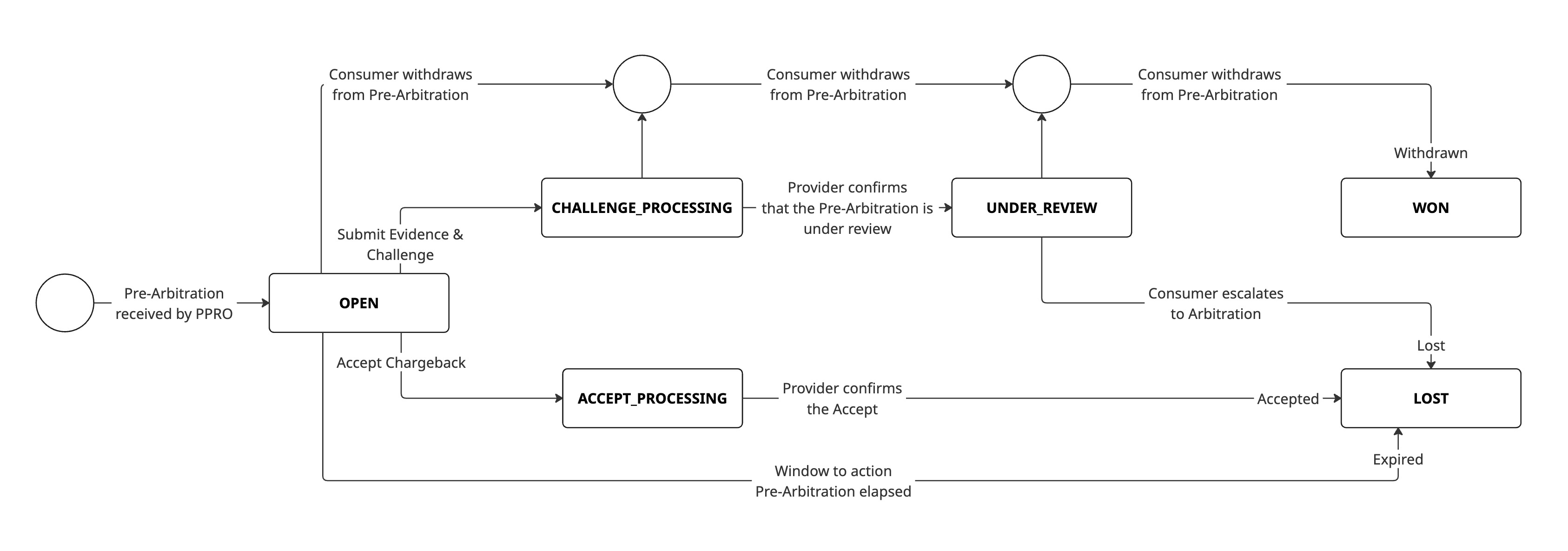
Status Definitions
Understanding pre-arbitration states helps you track progress and know what actions are available:
| State | Description |
|---|---|
| OPEN | Ready for available actions |
| ACCEPT_PROCESSING | Accept action submitted |
| CHALLENGE_PROCESSING | Challenge action submitted |
| UNDER_REVIEW | Consumer bank actively reviewing evidence |
| WON | Consumer bank withdrew from pre-arbitration |
| LOST | Merchant withdrew or consumer bank has escalated to arbitration |
Supported Payment Methods
The following payment methods utilise pre-arbitration:
Pre-Arbitration Resolution Flow
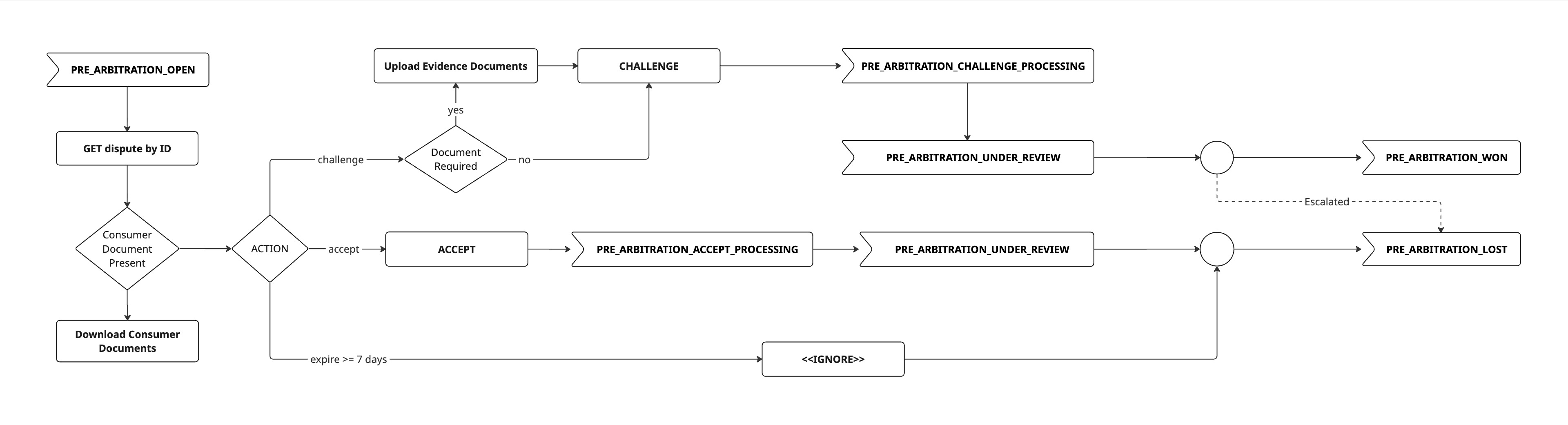
1. Receive pre-arbitration notification
When a dispute is escalated to pre-arbitration against a merchant account, a PRE_ARBITRATION_OPEN webhook notification is sent to the registered endpoint.
2. Retrieve pre-arbitration details
Retrieve detailed information about the dispute, including the reason, status, any new files and messages, as well as allowedActions and allowedCapabilities. Full list of reason codes can be accessed here.
API endpoint: GET /v1/disputes/{disputeId}
When to use:
- Immediately after receiving
PRE_ARBITRATION_OPENwebhook - To check current status of in-progress disputes
3. Download files (when available)
Download any documentation or evidence submitted by the consumer/ consumer bank.
API endpoint: GET /v1/disputes/{disputeId}/files/{fileId}
The response provides:
- A time-limited download URL for secure file access
- File metadata (name, type, size)
When to use:
- After retrieving pre-arbitration details (if files are attached)
- To review consumer/ consumer bank submitted evidence before preparing a response
4. Add messages (when allowed)
Communicate directly with the consumer bank during the pre-arbitration resolution process by posting messages. To check if messages can be added as well as the maximum characters allowed, see allowedCapabilitiesin the dispute details API response body.
API endpoint: POST /v1/disputes/{disputeId}/messages
When to use:
- Direct communication with the consumer bank to resolve disputes amicably
- Negotiating a resolution before challenging/ accepting
Important: This endpoint is available only when the payment provider supports direct messaging and it is supported in the respective phase. See each supported payment provider's page for the exact settings, such as whether messaging is supported. You will receive a webhook notification every time a new message is posted.
5. Upload supporting files (when allowed)
During communication with the consumer bank, upload documentation to support a case or to answer questions. Multiple files can be uploaded. To check if files can be uploaded as well as the accepted formats and file size limitations, see allowedCapabilitiesin the dispute details API response body.
API endpoint: POST /v1/disputes/{disputeId}/files
When to use:
- During communication with the consumer bank
Important: The file upload endpoint is used for sending files as part of the messaging feature and when challenging a dispute. If, for example, messaging is supported by the provider, you use the file upload endpoint to attach files to your messages. If messaging is not supported, you use the file upload endpoint to upload your evidence before you challenge.
Important: Files uploaded may be immediately visible to the provider or consumer. See each supported payment provider's page for more information.
6. Accept or challenge
Submit the final decision on how to handle the dispute.
API endpoint: POST /v1/disputes/{disputeId}/actions
ACCEPT
- Agreement with the consumer bank
- The disputed amount is returned to the consumer
- Dispute is closed (status:
LOST) - No evidence submission required
CHALLENGE
- The dispute is contested with evidence
- Previously uploaded evidence is submitted to the consumer bank
- Consumer bank reviews and reaches a decision
- May result in
WON(merchant keeps funds) orLOST(funds returned to consumer)
Important: A response is required before the deadline (see the action's
dueBydate) otherwise the dispute will be closed by the provider with status:LOST
CHALLENGEmay require evidence upload (Step 5) before submissionActions cannot be reversed once submitted
Refunds are not automatically processed when accepting, they must be separately initiated
7. Track dispute resolution
Webhook events:
PRE_ARBITRATION_ACCEPT_PROCESSINGPRE_ARBITRATION_CHALLENGE_PROCESSINGPRE_ARBITRATION_UNDER_REVIEWPRE_ARBITRATION_UPDATEDPRE_ARBITRATION_WONPRE_ARBITRATION_LOST
Possible final outcomes:
| Status | Meaning | Impact |
|---|---|---|
| WON | Consumer bank withdrew from pre-arbitration | Merchant retains funds, dispute closed. |
| LOST | Merchant withdrew or consumer bank has escalated to arbitration | Funds returned to consumer and dispute closed or dispute is escalated to arbitration phase. |