
Disputes Resolution Flow
This guide walks you through the dispute resolution lifecycle, from receiving initial notifications to resolving disputes through acceptance or challenge.
Dispute Resolution Flow
Within each phase, a set of allowedActions and allowedCapabilities will be present in the dispute details payload. By performing an action, you transition the dispute into a new status as described in the image below. Not taking any action will ultimately result in the payment provider transitioning the status lost.
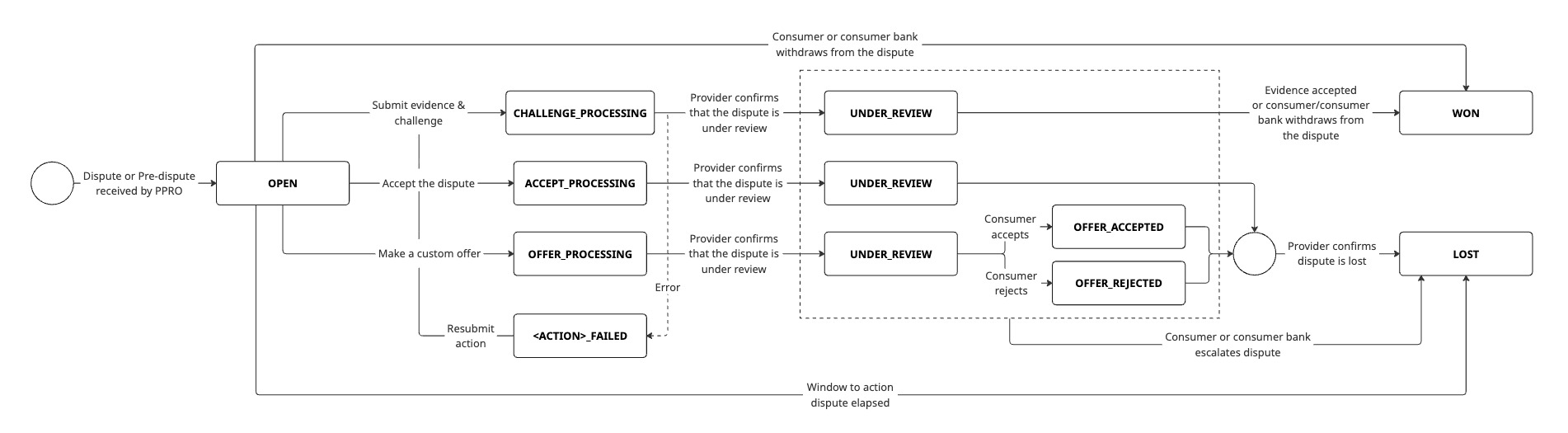
The below table describes all possible states that a dispute can be in within a single phase:
| State | Description |
|---|---|
OPEN | This is the starting state of a phase |
ACCEPT_PROCESSING | Accept action submitted |
ACCEPT_FAILED | The accept action failed and should be retried. |
CHALLENGE_PROCESSING | Challenge action submitted |
CHALLENGE_FAILED | The challenge action failed and should be retried. |
OFFER_PROCESSING | Offer action submitted |
OFFER_FAILED | The offer action failed and should be retried. |
UNDER_REVIEW | The provider has confirmed that the dispute is being reviewed |
OFFER_ACCEPTED | The consumer accepted the merchant's offer |
OFFER_REJECTED | The consumer rejected the merchant's offer |
WON | Decision made in the merchant's favor |
LOST | Decision made in the consumer's favor |
VOIDED | The dispute is no longer valid |
Important: Not all states are possible in each phase, it depends on the payment provider. By supporting all actions and states, you will automatically support any new payment method dispute process.
It is possible for a status to be skipped, but
WON/LOSTwill be set before a dispute changes phase.A dispute can be
VOIDEDby PPRO or the provider at any time.PPRO will attempt to resolve any
FAILEDactions on your behalf and will reach out directly if there is an error in your submission that cannot be resolved.
General Dispute Resolution Process
The diagram below shows a standard approach on how to handle a dispute from open to won or lost including the chargeback created events. This can be applied to all phases: pre-dispute, dispute, pre-arbitration, arbitration. For more specific details about the chargeback events, including separate diagrams, please read the dedicated chargebacks page.
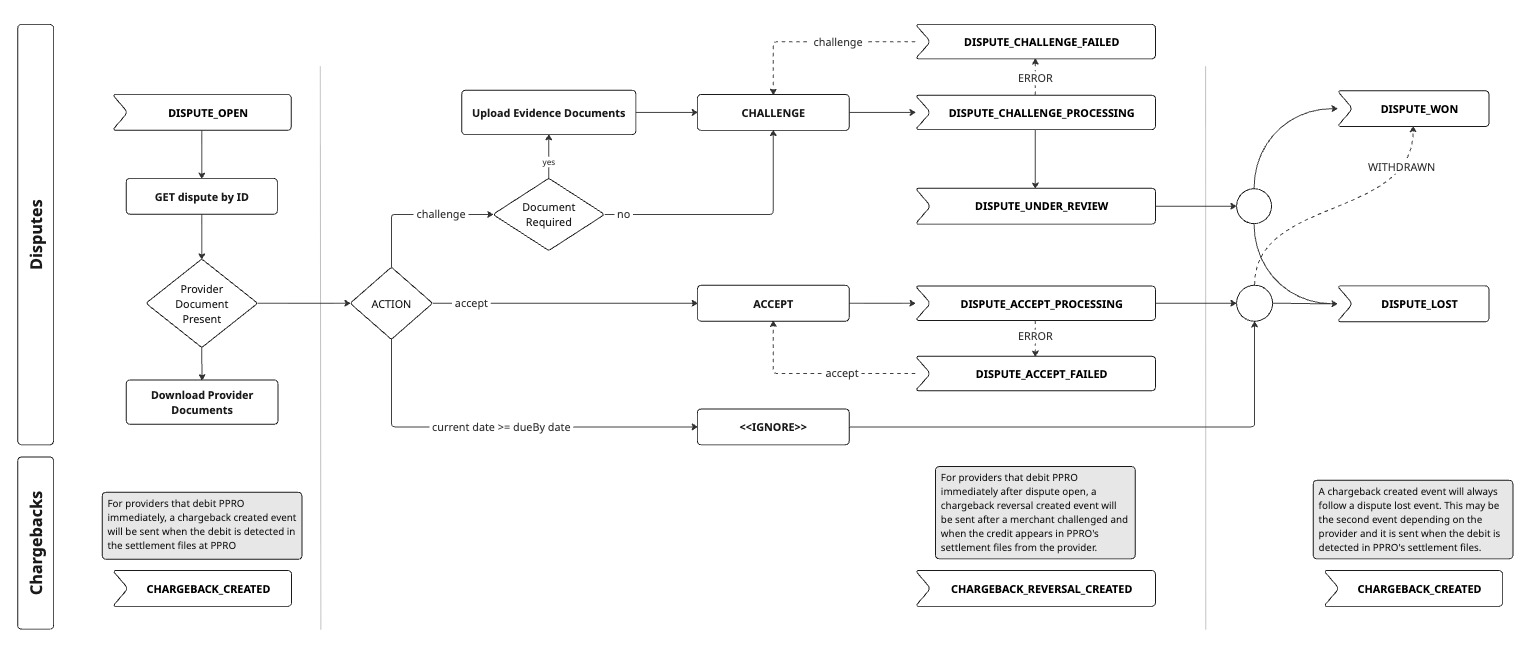
1. Receive dispute notification
When a dispute or pre-dispute is created against a merchant account, a DISPUTE_OPEN or PRE_DISPUTE_OPEN webhook notification is sent to the registered endpoint.
This also applies when the phase of a dispute changes, also called escalation, for example from dispute to pre-arbitration, a PRE_ARBITRATION_OPEN webhook notification is sent.
Important points on chargebacks: Depending on the payment provider, a chargeback_created event may be sent soon after the dispute is opened and regardless of the current state of the dispute. This is because PPRO issues a chargeback_created event as soon as they detect the debit from the provider in the settlement files. To see more examples of this, please read the dedicated chargebacks page.
2. Retrieve dispute details
Upon receipt of a PHASE_OPEN webhook notification, you should fetch the complete dispute details:
API endpoint: GET /v1/disputes/{disputeId}
This allows you to get detailed information about the dispute, including the phase, reason, status, consumer provided files and messages, as well as allowedActions and allowedCapabilities.
You need to look at the allowedActions and allowedCapabilities to determine what is possible at this phase of the dispute. The following is a comprehensive list of actions that may appear in allowedActions:
| Action | Description |
|---|---|
| ACCEPT | Use accept action to accept the dispute. This will transition the dispute to lost and in most cases, result in a chargeback being issued |
| CHALLENGE | Use challenge to fight the dispute and prevent a chargeback. The provider will review your evidence and make the final decision |
| OFFER | Use offer to make a custom offer directly to the consumer, such as offering a gift voucher. Making a custom offer gives the merchant more flexibility in their options and allows them to see if the consumer will accept it or not prior to actually sending the offer |
The following is a comprehensive list of capabilities that may appear in allowedCapabilities:
| Capability | Description |
|---|---|
| UPLOAD_FILE | Use upload file to upload your evidence prior to using the challenge action. Uploading a file will send the file directly to providers in most cases and sometimes these files are made directly available to consumers. Important: Make sure to check each payment provider's dispute process to find out when and to whom files are made available when uploaded |
| POST_MESSAGES | Some providers allow direct messaging between the merchant and consumer or consumer bank. Use the post message capability to exchange messages between parties prior to a decision like accept or challenge. Important: The post message capability is not the same as the message attached to an action, however providers can see all messages exchanged regardless of which feature they were sent through, so you should treat any message sent as potential evidence that can be reviewed by the provider |
Finally, a full list of reason codes can be accessed here.
3. Download files (when available)
Before deciding which action to take, you should gather any evidence sent by the consumer or provider by downloading all files attached to the dispute:
API endpoint: GET /v1/disputes/{disputeId}/files/{fileId}
The response provides:
- A time-limited download URL for secure file access
- File metadata (name, type, size)
Important: Not all disputes include provider or consumer-submitted files.
4. Add messages (when allowed)
If the POST_MESSAGES capability is available for this dispute in the allowedCapabilities, you can choose to communicate directly with the consumer or payment provider:
API endpoint: POST /v1/disputes/{disputeId}/messages
This is useful for resolving disputes amicably, for example by clearing up any confusion the consumer may have had.
Important: This endpoint is available only when the payment provider supports direct messaging and it is supported in the respective phase. See each supported payment provider's page for the exact settings, such as whether messaging is supported. You will receive a webhook notification every time a new message is posted.
5. Upload supporting files (when allowed)
If you have reviewed all the evidence and trying to resolve the dispute via direct messaging did not work or was not available, the merchant can now upload evidence in their defence if they are going to challenge. To check if files can be uploaded as well as the accepted formats and file size limitations, see allowedCapabilitiesin the dispute details API response body.
API endpoint: POST /v1/disputes/{disputeId}/files
Important: The file upload endpoint is used for sending files as part of the messaging feature and when challenging a dispute. If, for example, messaging is supported by the provider, you use the file upload endpoint to attach files to your messages. If messaging is not supported, you use the file upload endpoint to upload your evidence before you challenge.
Important: Files uploaded may be immediately visible to the provider or consumer. See each supported payment provider's page for more information.
Important: Most providers only accept files in the local language, please see each supported payment provider's page for the required language.
6. Take action: Accept, challenge or custom offer
When ready and before the due date, submit a final decision on how to handle the dispute. To check which actions are available, see allowedActions.
API endpoint: POST /v1/disputes/{disputeId}/actions
The actions are described in step 2.
Important points on chargebacks: Depending on the payment provider, a chargeback_reversal_created event may be sent approximately soon after the dispute is challenged and regardless of the current state of the dispute. This is because PPRO issues a chargeback_reversal_created event as soon as they detect the credit from the provider in the settlement files. To see more examples of this, please read the dedicated chargebacks page.
Important:
A response is required before the deadline (see the action's
dueBydate) otherwise the dispute will be closed by the provider with status:LOSTNo available action means that the
dueBydate for the action has passed or that there were no actions availableMake sure you upload evidence (Step 5) before using
CHALLENGEActions cannot be reversed once submitted
7. Track dispute resolution
Finally, you should track any updates on the dispute to know if or when further action may be required. Updates are provided by webhook events such as the following in the dispute phase:
DISPUTE_ACCEPT_PROCESSINGDISPUTE_ACCEPT_FAILEDDISPUTE_CHALLENGE_FAILEDDISPUTE_UNDER_REVIEWDISPUTE_UPDATEDDISPUTE_WONDISPUTE_LOSTDISPUTE_VOIDED
Remember that a dispute may escalate to the next or a higher phase, in which case you will receive an open webhook such as PRE_ARBITRATION_OPEN and then you will start from the top at step 1.
Important points on chargebacks: A chargeback_created event will be sent after the dispute is lost. This is because PPRO issues a chargeback_created event as when they detect a debit from the provider in the settlement files. This may be the second chargeback_created event that you receive. To see more examples of this, please read the dedicated chargebacks page.
Updated about 1 month ago