
Chargebacks
In the PPRO ecosystem, a dispute can progress through several phases during its lifecycle, while a chargeback can occur at different points in the dispute lifecycle depending on the payment method's rules.
A chargeback represents the actual clawback of funds from PPRO as part of settlement with the payment provider. This might be different to other dispute management systems where chargebacks are the initiation of a dispute with the intention of funds movement occurring sometime thereafter.
Use cases for the chargeback notifications include settlement and reconciliation. For all other use cases, we recommend relying on the dispute notifications themselves.
Understanding the Timing of a Chargeback
A chargeback represents the actual clawback of funds from PPRO as part of settlement with the provider. Depending on the payment provider, the timing of a PPRO chargeback event will be different:
1. Preemptive Chargeback Scenario
In this scenario, the financial hit and the dispute notification happen at close together. The provider "claws back" the funds immediately to protect the consumer while the case is being reviewed.
The diagram below illustrates how the chargeback event is sent out when the dispute is opened, how it is reversed when the merchant challenges and finally, how it is sent again if the challenge is lost.
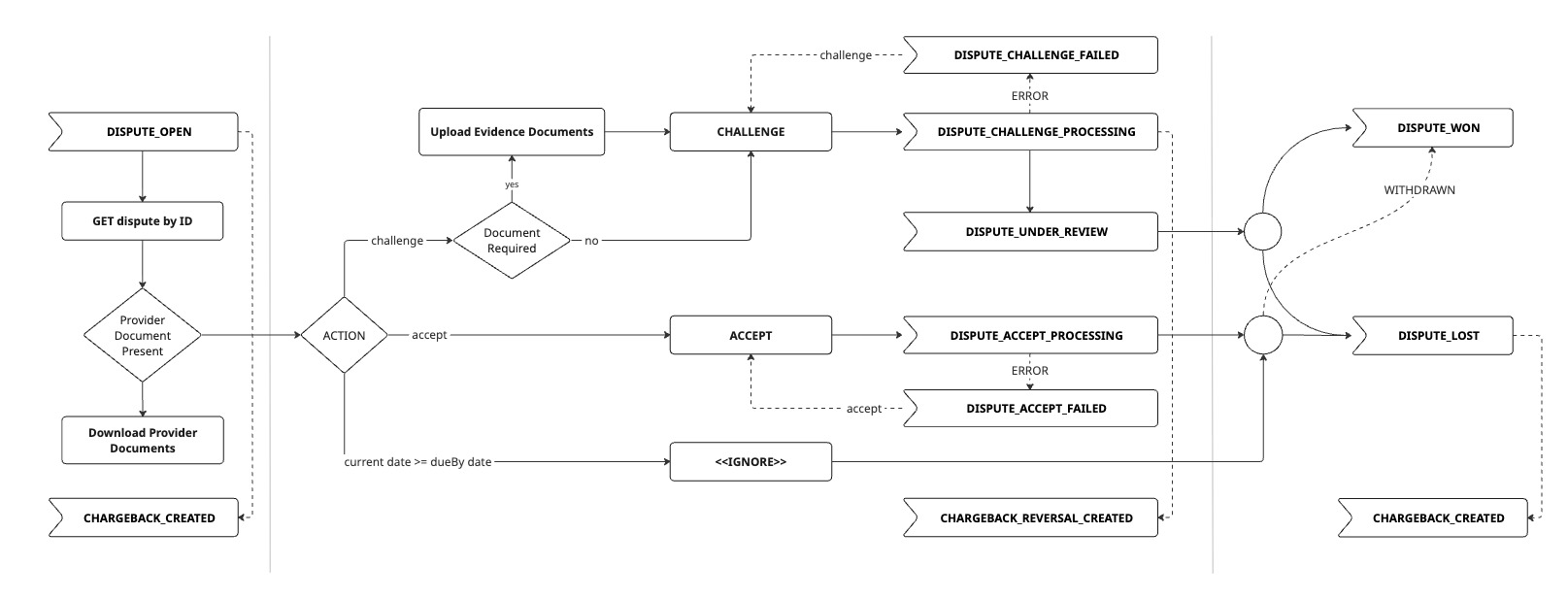
Example: Brazil local acquiring (cards) Consumer disputes and merchant loses
| Event Issued | Timing |
|---|---|
dispute_open | This is the first event |
chargeback_created | The chargeback will appear in PPRO settlement files after the dispute is opened |
challenge_processing | The dispute can be challenged up to the dueBy date |
chargeback_reversal_created | The chargeback reversal will appear in PPRO settlement files approx 1-2 days after the dispute is challenged |
dispute_lost | The decision from the provider can take up to 180 days |
chargeback_created | The chargeback will appear in PPRO settlement files once the decision is made and funds are settled by the acquirer - up to 180 days |
Chargeback timing depends on the acquirer, local acquiring in Brazil should support post-decision chargeback scenarios as well.
Example: Wero Consumer disputes and merchant loses
| Event Issued | Timing |
|---|---|
dispute_open | This is the first event |
chargeback_created | The chargeback is notified to PPRO via API and so the event will arrive minutes after the dispute is opened |
challenge_processing | The dispute can be challenged up to the dueBy date |
chargeback_reversal_created | The chargeback reversal is issued by PPRO via API and so the event will arrive minutes after the funds transfer is confirmed |
dispute_lost | The decision from the provider can take days to arrive |
pre_arbitration_open | Because Wero supports multiple phases, the dispute will escalate to pre_arbitration |
chargeback_created | The chargeback is notified to PPRO via API and so the event will arrive minutes after the dispute is escalated |
Wero is a real-time account-to-account payment, the provider prioritizes returning funds to the consumer immediately while the dispute is evaluated.
2. Post-decision Chargeback Scenario
The funds remain with the merchant while the dispute is being contested. The chargeback only occurs if the merchant loses the case or fails to respond.
The diagram below illustrates how the chargeback event is only sent out if the dispute is lost.
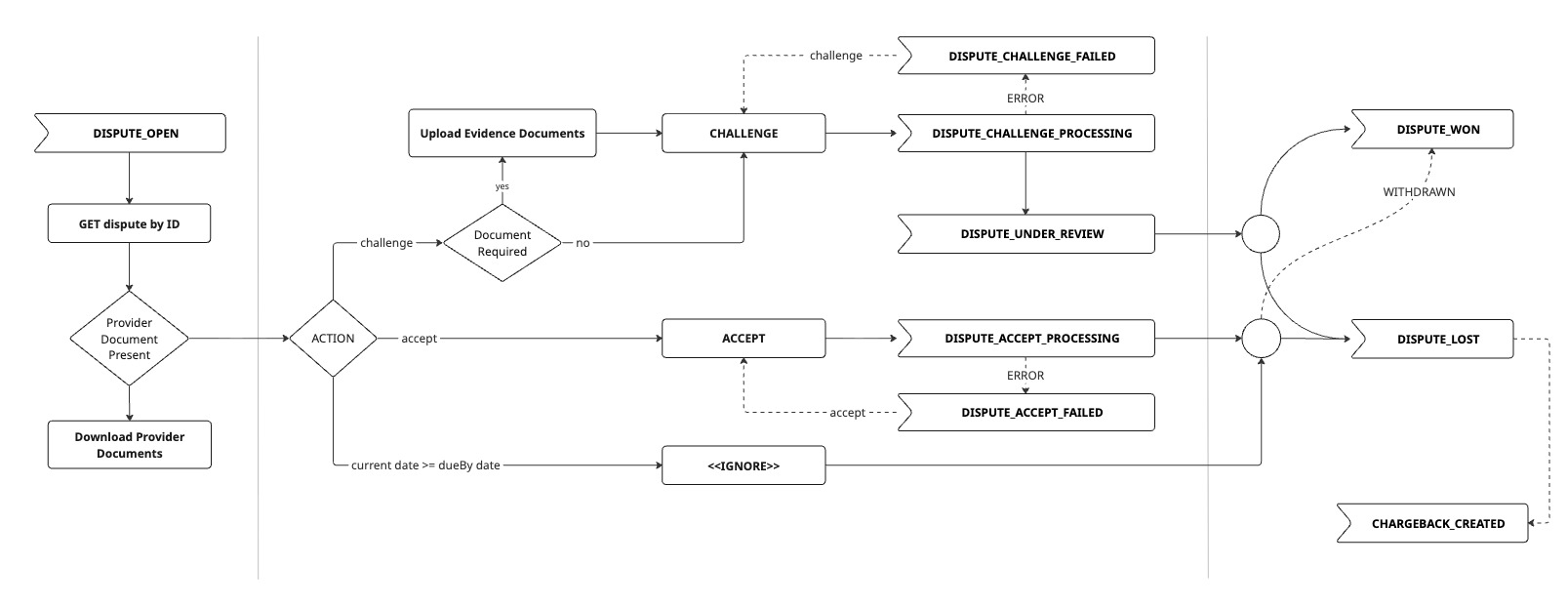
Example: Brazil local acquiring (cards) Consumer disputes and merchant loses
| Event Issued | Timing |
|---|---|
dispute_open | This is the first event |
challenge_processing | The dispute can be challenged up to the dueBy date |
dispute_lost | The decision from the provider can take up to 180 days |
chargeback_created | The chargeback will appear in PPRO settlement files once the decision is made and funds are settled by the acquirer - up to 180 days |
Chargeback timing depends on the acquirer, local acquiring in Brazil should support preemptive chargeback scenarios as well.
Important: From the consumer's perspective, the card networks will always claw back the funds within one or two days regardless of when the card acquirer claws the funds back from PPRO
Example: Afterpay Consumer disputes and merchant wins
| Event Issued | Timing |
|---|---|
dispute_open | This is the first event |
challenge_processing | The dispute can be challenged up to the dueBy date |
dispute_won | The decision from the provider can take weeks to arrive |
In this scenario, the payment provider holds the "financial hit" until a final determination is made, allowing the merchant to keep their liquidity during the defense process.
3. Undisputable Chargeback Scenario
In this scenario, the funds are clawed back without a dispute being raised as open.
Example: SEPA Direct Debit Consumer disputes and merchant automatically loses
| Event Issued | Timing |
|---|---|
dispute_lost | This is the first event |
chargeback_created | The chargeback is notified immediately because it is read directly from bank statements |
Retrieving chargeback details
1. Receive chargeback notification
When a chargeback is created or reversed against a dispute (regardless of phase), a CHARGEBACK_CREATED or CHARGEBACK_REVERSAL_CREATED webhook notification is sent to the registered endpoint.
2. Receive chargeback details
Retrieve detailed information about a specific chargeback or reversal, including the reason and amount.
API endpoint:
When to use:
- Immediately after receiving a
CHARGEBACK_CREATEDorCHARGEBACK_REVERSAL_CREATEDwebhook - To check the chargeback details for a dispute
Note: Chargeback and chargeback reversal details are also available through the dispute itself.
Updated 16 days ago