
Arbitration
This guide walks you through the arbitration lifecycle and resolution flow.
Arbitration serves as the final, legally binding stage of a dispute resolution process, occurring only when the initiating and receiving parties fail to reach an agreement during preliminary cycles. In this phase, the case is escalated to an independent governing body or committee that conducts a definitive review of all submitted evidence to determine liability. Because this stage often carries significant administrative fees and its ruling cannot be appealed, it acts as a "court of last resort" to ensure a conclusive end to the dispute lifecycle.
Arbitration is part of the extended dispute lifecycle, defined here.
Arbitration Lifecycle
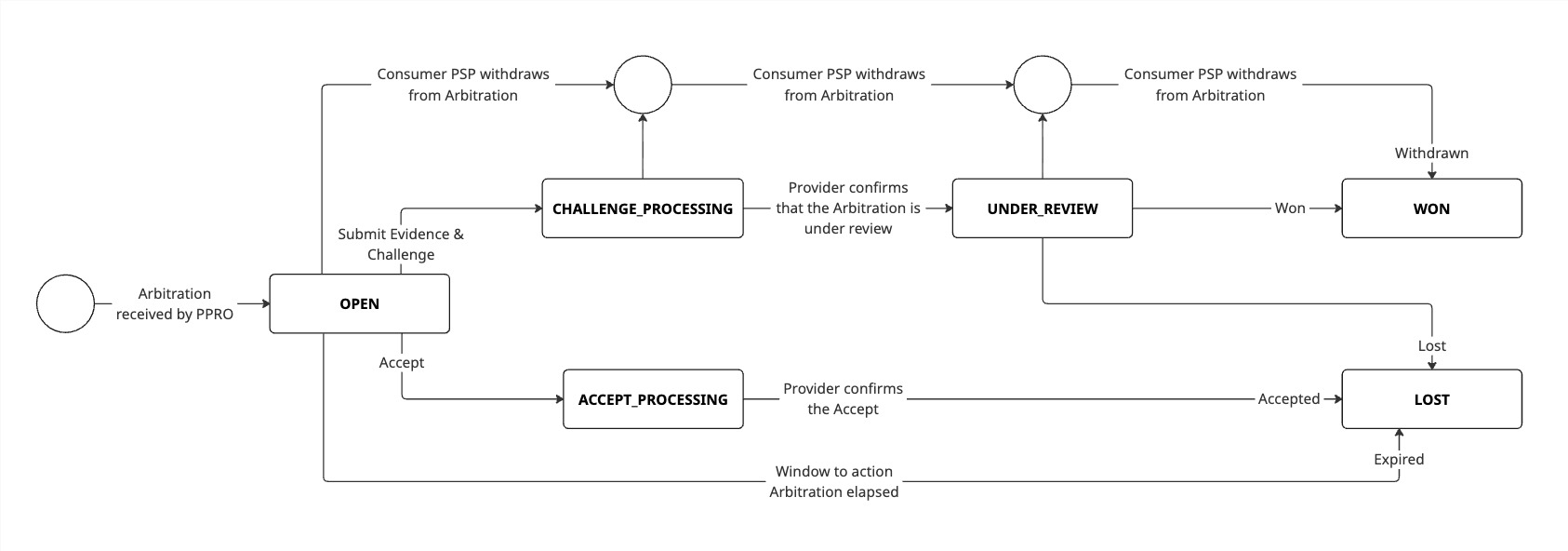
Status Definitions
Understanding arbitration states helps you track progress and know what actions are available:
| State | Description |
|---|---|
| OPEN | Ready for available actions |
| ACCEPT_PROCESSING | Accept action submitted |
| CHALLENGE_PROCESSING | Challenge action submitted |
| UNDER_REVIEW | An arbitration committee is actively reviewing all evidence |
| WON | Arbitration committee ruled in the merchant's favor |
| LOST | Arbitration committee ruled in the consumer's favor |
Supported Payment Methods
The following payment methods utilise arbitration:
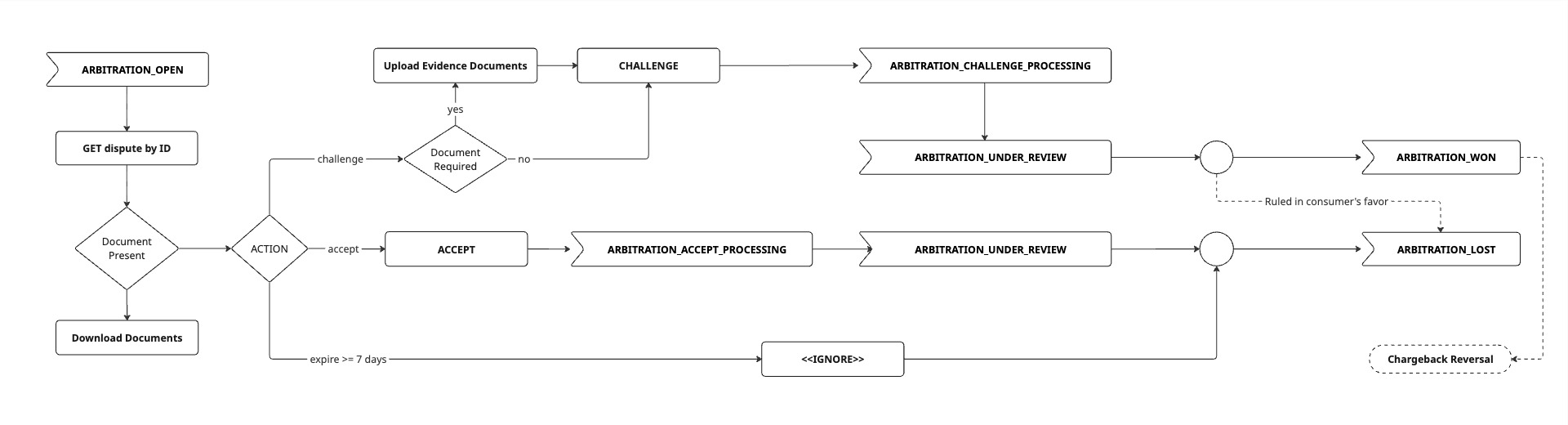
Arbitration Resolution Flow
1. Receive arbitration notification
When a dispute is escalated to arbitration against a merchant account, an ARBITRATION_OPEN webhook notification is sent to the registered endpoint.
2. Retrieve arbitration details
Retrieve detailed information about the dispute, including the reason, status, any files and messages, as well as allowedActions and allowedCapabilities. Full list of reason codes can be accessed here.
API endpoint: GET /v1/disputes/{disputeId}
When to use:
- Immediately after receiving
ARBITRATION_OPENwebhook - To check current status of in-progress disputes
3. Download files (when available)
Download any documentation or evidence submitted by the consumer/ consumer bank.
API endpoint: GET /v1/disputes/{disputeId}/files/{fileId}
The response provides:
- A time-limited download URL for secure file access
- File metadata (name, type, size)
When to use:
- After retrieving arbitration details (if files are attached)
4. Add messages (when allowed)
Communicate directly with the arbitration committee during the arbitration resolution process by posting messages. To check if messages can be added as well as the maximum characters allowed, see allowedCapabilitiesin the dispute details API response body.
API endpoint: POST /v1/disputes/{disputeId}/messages
When to use:
- When communicating directly with the arbitration committee, when for instance additional information is requested or clarification is required
Important: This endpoint is available only when the payment provider supports direct messaging and it is supported in the respective phase. See each supported payment provider's page for the exact settings, such as whether messaging is supported. You will receive a webhook notification every time a new message is posted.
5. Upload supporting files (when allowed)
During communication with the arbitration committee, upload additional documentation to support a case or to answer questions. Multiple files can be uploaded. To check if files can be uploaded as well as the accepted formats and file size limitations, see allowedCapabilities in the dispute details API response body.
API endpoint: POST /v1/disputes/{disputeId}/files
When to use:
- During communication with the arbitration committee
Important: The file upload endpoint is used for sending files as part of the messaging feature and when challenging a dispute. If, for example, messaging is supported by the provider, you use the file upload endpoint to attach files to your messages. If messaging is not supported, you use the file upload endpoint to upload your evidence before you challenge.
Important: Files uploaded may be immediately visible to the provider or consumer. See each supported payment provider's page for more information.
6. Accept or challenge
Submit the final decision on how to handle the dispute.
API endpoint: POST /v1/disputes/{disputeId}/actions
ACCEPT
- Agreement with the consumer bank
- The disputed amount is returned to the consumer
- Dispute is closed (status:
LOST) - No evidence submission required
CHALLENGE
- The dispute is contested with evidence
- Previously uploaded evidence is submitted to the arbitration committee
- Arbitration committee reviews and reaches a decision
- May result in
WON(merchant keeps funds) orLOST(funds returned to consumer)
Important: A response is required before the deadline (see the action's
dueBydate) otherwise the dispute will be closed by the provider with status:LOSTActions cannot be reversed once submitted
7. Track dispute resolution
Webhook events:
ARBITRATION_ACCEPT_PROCESSINGARBITRATION_CHALLENGE_PROCESSINGARBITRATION_UNDER_REVIEWARBITRATION_UPDATEDARBITRATION_WONARBITRATION_LOST
Possible final outcomes:
| Status | Meaning | Impact |
|---|---|---|
| WON | Arbitration committee ruled in the merchant's favor | Merchant retains funds, the chargeback is reversed, dispute closed. |
| LOST | Arbitration committee ruled in the consumer's favor | Dispute is closed. |