
Payment method enrollment
Once a merchant has been boarded and assigned a merchant ID, they must be enrolled in specific payment methods to begin transacting.
- Scheme Prerequisite: 20+ high-volume schemes (such as iDEAL, TWINT, Wero, and BLIK) require explicit enrollment before processing payments.
- Data Variability: Data requirements for enrollment can vary significantly based on the specific payment scheme and the merchant's operating region.
Aligned with the Merchant Boarding process, payment method enrollment can be performed via both the PPRO Dashboard and the Global API.
Enrollment is currently supported for the following payment methods via API (this list is growing — check back regularly as more schemes are added):
Category Supported payment methods Digital Wallet TWINT, Wero, MB WAY Bank Transfer iDEAL, Trustly, EPS, BLIK, Multibanco, SEPA Direct Debit Cash OXXO Pay Cards Bancontact Some payment methods require additional one-time configuration before enrollment will succeed. If you run into issues enrolling a merchant, reach out to our Support team or your Technical Account Manager.
Enrollment requests
Enrolling payment methods is a simple process - to enroll a merchant with a payment method, send a request to the enrollment endpoint with the desired paymentMethod.
Request
{
  "paymentMethod": "TWINT"
}
Enrollment response
You'll receive a response with the enrollment status:
{
  "id": "enrollment_zNSICpiwfevcOwcZGgqVJ",
  "paymentMethod": "TWINT",
  "status": "ACTIVE",
  "createdAt": "2025-11-16T10:15:30Z",
  "updatedAt": "2025-11-16T10:15:30Z",
  "_links": {
    "merchant": {
      "href": "/v1/merchants/{merchant-id}"
    }
  }
}
Enrollment process
While some enrollments are processed immediately, others may require additional time for verification or approval by the payment provider. The status field in the enrollment response indicates the current state of the enrollment request. For some schemes, PPRO is able to support instant enrollment, allowing you to instantly begin to transact with the given merchant and scheme.
Synchronous enrollment (instant)
For providers that support instant enrollment, an ACTIVE status is returned synchronously within a specified time limit (e.g., 1 second). This approach allows you to integrate enrollment directly into your payment flow without additional waiting.
Asynchronous enrollment (delayed)
If the enrollment requires additional processing time by the provider, the status will be set to INITIATED. In this case, you'll need to handle the enrollment asynchronously and monitor the status to know when the payment method is ready.
If the provider requires further verification, the status will change to PROVIDER_PENDING, indicating that the enrollment is awaiting additional review or approval from the provider.
For asynchronous flows, you can implement one of the following:
- Polling: Periodically check the enrollment status using the provided enrollment ID.
- Webhooks: Set up a callback URL to receive updates when the enrollment status changes.
To ensure a seamless integration, it's important to support both synchronous and asynchronous flows.
Enrollment status
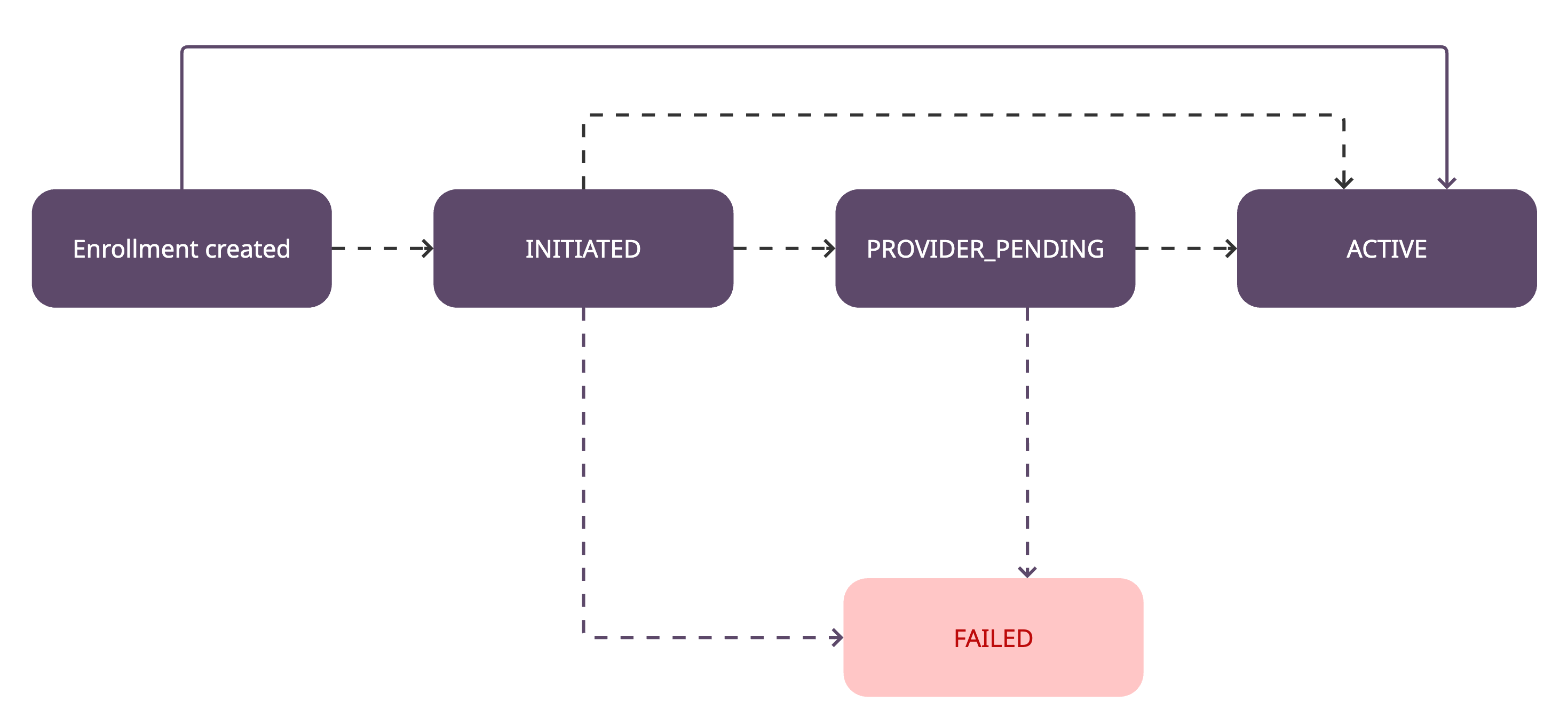
INITIATED: The enrollment request has started, but is still processing. From this status the enrollment can move to FAILED, PROVIDER_PENDING, or ACTIVE.
FAILED: The enrollment process encountered an error, and the merchant was not successfully enrolled. This is a final status and cannot be reversed. A failure object will be included in the response, detailing why the enrollment failed.
PROVIDER_PENDING: Further processing time is required by the provider to complete the enrollment. From this status the enrollment can move to FAILED or ACTIVE.
ACTIVE: The merchant has been successfully enrolled and is fully enabled to accept payments through the selected payment method.
Enrollment notifications
This webhook is in development. Details below may change before general availability.
PPRO notifies you by webhook when an enrollment's status changes.
Event type: ENROLLMENT_STATUS_UPDATED
| Status | Meaning |
|---|---|
PENDING | The enrollment has been submitted and is in progress. |
PROVIDER_PENDING | Waiting on the payment provider. |
ACTIVE | Enrolled — the payment method is usable. |
FAILED | Enrollment failed at the provider or scheme after retries. See statusReason. |
SUSPENDED | The payment method is currently not usable for the merchant. |
CLOSED | Reserved for when the merchant itself is closed — not emitted yet. |
See Webhooks for more details.
Updated 14 days ago